
EHSync Hauldesk
Plan the load. Keep the record. Get paid.
The day board for a haulage company. Put booked work on a vehicle. The driver uses their phone. Print the consignment note for the customer, then issue the invoice.
Launching March 2027
EHSync Hauldesk goes live in March 2027, with the other EHSync apps.
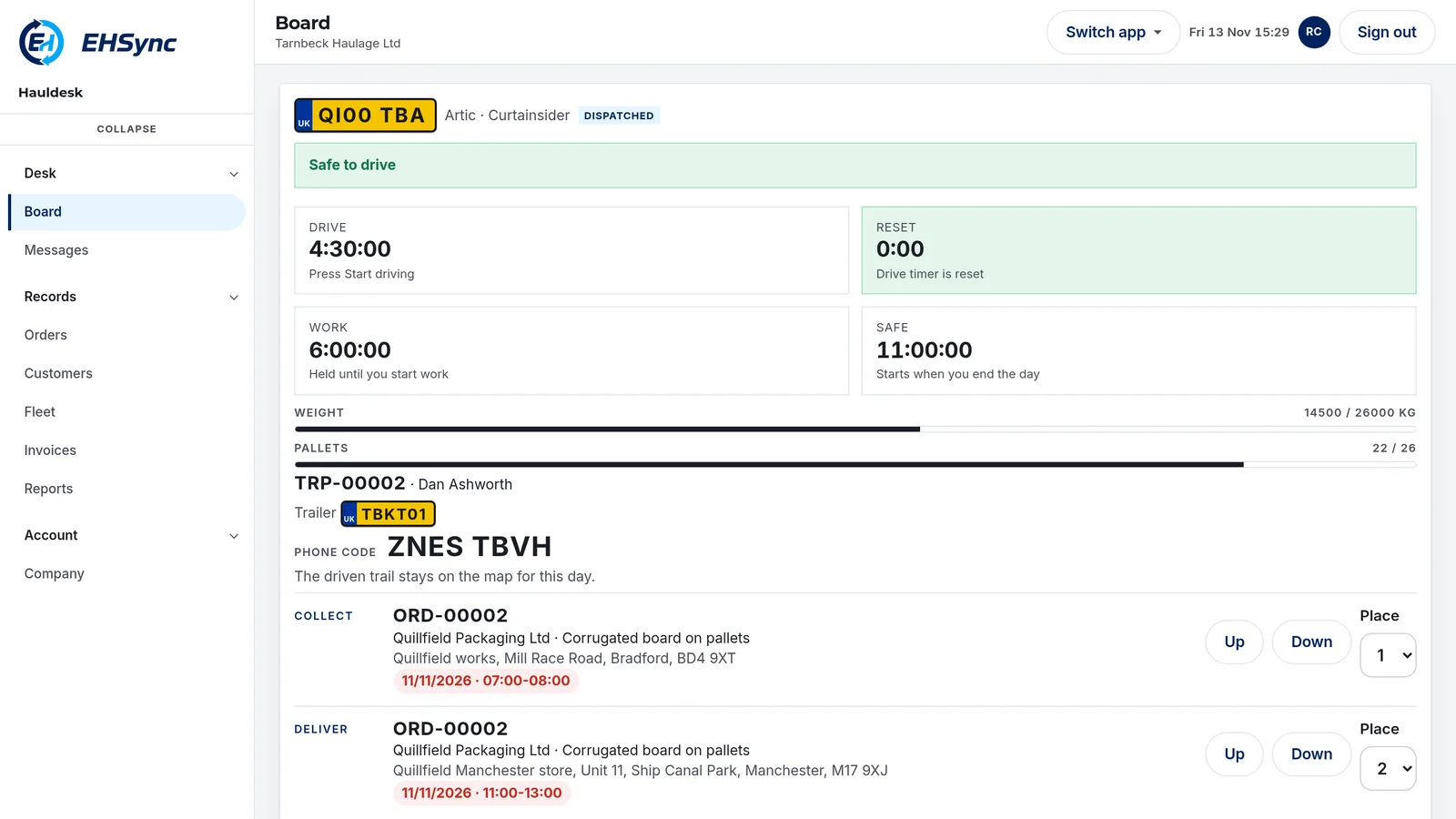
The desk
The load, the phone, and the invoice stay with the job.
Planned before it rolls
A booked order sits in To plan until a vehicle and a driver take it. Collect and deliver are one trip. The trip carries the phone code.
Signed on the phone
The driver marks the collection and the customer signs the delivery there. Who signed, when, and whether there was a shortage, damage, or a refusal.
The office sees the phone
While the run is open, the map shows that phone. If location is off, the run still works. Messages go both ways.
Then it can be billed
Invoices are raised from delivered work. VAT is on the order. Paid and void are statuses on the invoice.
Your company, your jobs
Each company sees only its own customers, vehicles, drivers, and orders. A second company does not inherit the first board.
11/10/2026 · TRP-00003
FG34 HIJ
Driver
Jordan Hale. Hand the customer their consignment note. Sign the delivery here. While this run is open, the office map shows this phone.
Location is off. The run still works.
Your route
This journey starts from where you are now and finishes at the office.
What it is
The desk, and the driver's phone.
EHSync Hauldesk is where the planner books work and puts it on a vehicle. The driver opens that run with the phone code from the office. Customers, sites, vehicles, and drivers stay on the same desk as the order.
The driver marks the collection, and the customer signs the delivery on the driver's phone. While the run is open, the office map shows that phone. If location is off, the run still works. The consignment note is the paper copy for the customer. It is not a statutory CMR.
A job through the desk
01
Book
The customer, the goods, the price, and the two sites.
02
Plan
Onto a vehicle and a driver. A warning if the weight or the pallets do not fit. It still saves.
03
Drive
The phone code opens the run. Mark the collection. Sign the delivery. The office sees the phone while the run is open.
04
Invoice
Delivered orders for that customer. Print it. Mark it paid, or void it.
What the desk does
Board, orders, the driver's phone, invoices. The same job from the booking to the payment.
The day board
Put booked work on a vehicle. The driver uses their phone.
- Collect and deliver stay on the same trip.
- Stops can be moved up or down the run. Suggest order groups the stops by postcode, and keeps each collection before its delivery.
- A planned trip is marked dispatched when it leaves. The trip shows the phone code for that run.
- The board shows what is still to plan, the trips, what is awaiting invoice, and what is unpaid.
- The red line is the road still to drive. Grey is the part already passed. The dark line is the phone's own track. Choose a vehicle to zoom to its route.
- Bridge, weight, width, and speed limits are the signs recorded on OpenStreetMap. The truck route can be drawn again to avoid a bridge, weight, or width limit the vehicle cannot pass. Speed limits stay a warning.
- If the truck router is unavailable, the line falls back to a car route that does not avoid those limits. A missing sign is not a clearance.
- The office writes to the driver on the run. Replies appear on the board.
The order
General haulage or groupage, booked for a customer.
- Customer, goods, packages, pallets, and weight.
- Collection site and date. Delivery site and date.
- A customer reference, and notes.
- Draft, booked, planned, delivered, invoiced, or cancelled.
The fleet
The vehicles and the drivers that belong to the company.
- Artic, rigid, or van. Curtainsider, box, flat, or temperature controlled.
- A maximum weight, a height in metres, and a maximum number of pallets, where you set them.
- Over weight or over pallets warns you. The job still saves.
The driver's phone
Enter the phone code from the office.
- The consignment note is the paper copy for the customer.
- Mark the collection. Sign the delivery on the phone.
- While this run is open, the office map shows this phone.
- Location can be off. The run still works.
- The phone code opens the run. The office sign-in is a separate screen.
Proof of delivery
Signed on the driver's phone.
- Who received it, and when they signed.
- None, or a shortage, damage, or a refusal.
- The office can add a proof line on the order, with a photo or PDF of the signed note.
- A planned order becomes delivered. The trip completes when every order on it has a signature.
The invoice
A sales invoice for delivered work.
- VAT is worked out on each order, and it can be set to zero.
- Print it, mark it paid, or void it.
The daily check
A walkaround check on the driver's phone before the run.
- The driver marks every item. A defect is written down and does not block the run.
- It is the driver's record. It is not a tachograph reading.
- A drivers' hours guide on the phone counts driving, work, breaks, and rest. It does not replace the tachograph.
Reports
Work, unpaid invoices, exceptions, vehicles, and hours, for the dates you choose.
- Exceptions list each shortage, damage, or refusal.
- The VAT box figures are for your own return. They are not sent to HMRC.
- Print the desk report, or save it as a PDF.
The consignment note
Printed for the customer.
- It is the paper copy for the job.
- The carrier keeps the proof of delivery on the driver's phone.
- It is not a statutory CMR form.
Launching March 2027
All EHSync apps go live in March 2027. Register your interest and we will email you about the March 2027 launch.