
EHSync Projects
Plan the build. Then run it.
Projects with sections and milestones, tasks and checklists, time booking, workload, reports, and a client portal. It is not a cost system, and it is not a full CDM, RAMS, or permit desk.
Launching March 2027
EHSync Projects goes live in March 2027, with the other EHSync apps.
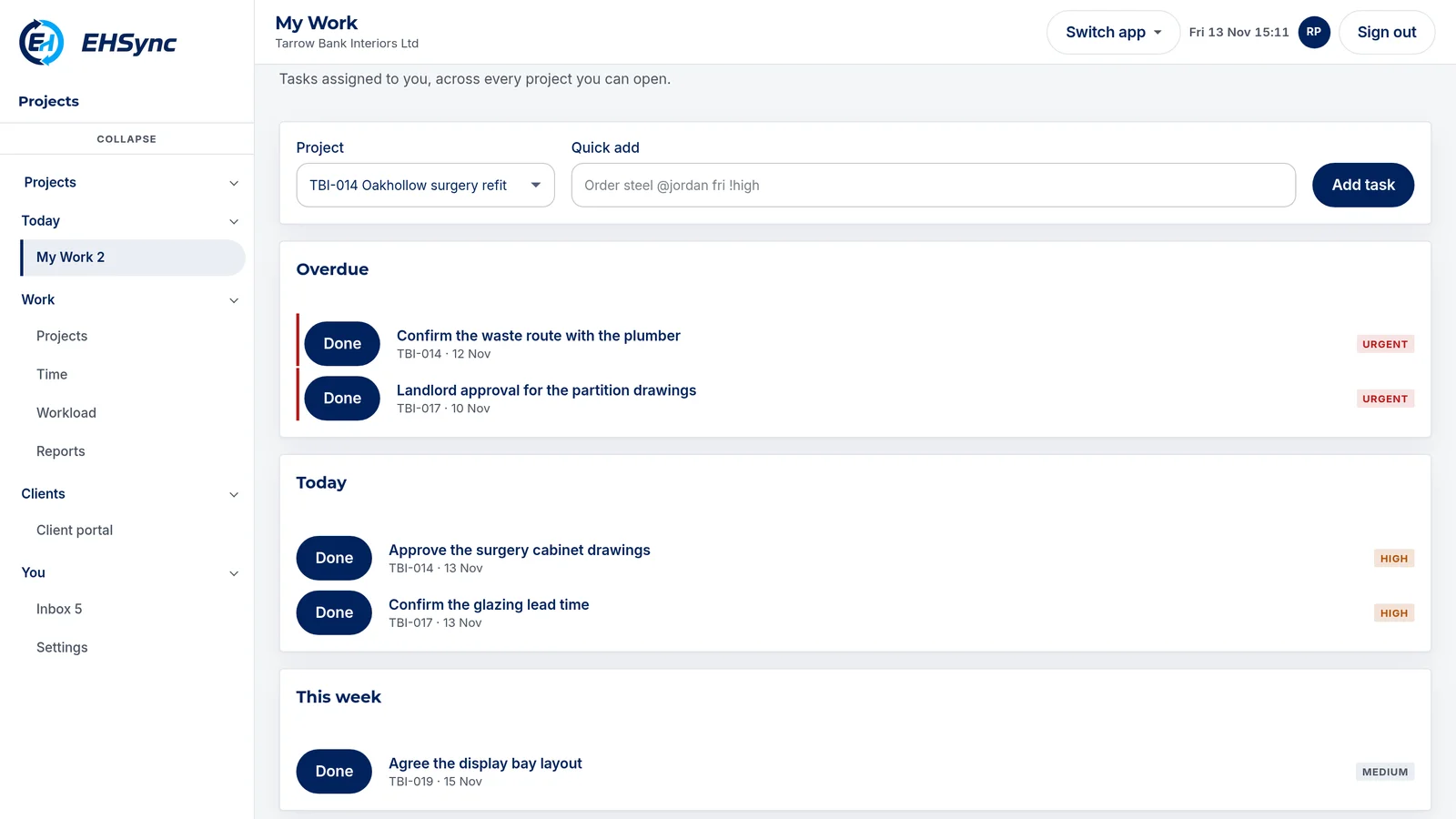
The benefit
You can see why a job is stuck, on the day, not in the Friday report.
The job is the record
A project holds sections, milestones, tasks, checklists, files, comments, and time. The client portal shows what you choose to share.
Tasks stay owned
A task has an assignee, dates, a checklist, and the tasks it depends on. Completing it is recorded on the project.
Time and workload
People book time against a task, or run the live timer. Workload and reports show what is open across projects.
Next to EHSync Safety
Safety keeps over 100 health and safety forms, actions, and registers on the site record. Projects keeps the programme of work. They are separate apps on one EHSync account.
Client portal
Guests see the milestones, files, and fields you choose to share, and can decide a milestone that needs their approval. Budgets and valuations stay in the commercial system.
What it is
The job, from plan to handover.
EHSync Projects holds the project, its sections and milestones, tasks and checklists, time, workload, reports, and a client portal. It is the programme of work. It is not a full CDM, RAMS, or permit desk.
Budgets and valuations stay in your own commercial system. EHSync Safety holds over 100 UK health and safety forms, actions, and registers on its own site record.
Under CDM 2015
- 01The principal contractor has to plan, manage, and monitor the construction phase. The phase plan is that plan, kept current.
- 02Pre-construction information is what the job starts from. Hazards already known, and what the designers have to hand over.
- 03Inductions, competence, and welfare are CDM duties on the site. EHSync Projects tracks project work. It does not replace a full CDM pack.
- 04The health and safety file is the pack the client gets at the end. Preparing it stays with the principal designer and the principal contractor. EHSync Projects does not compile it.
A job through the app
From set-up to sign-off.
01
Set up
Start a project from scratch, from a template, or from a CSV import. Invite the team, and guests for the client portal.
02
Plan
Sections, milestones, and tasks, with dependencies between tasks. Recurring tasks come round again on their own.
03
Run
Tasks and checklists move through list, table, board, calendar, and timeline views. Time is booked by hand or with the live timer.
04
Report and share
Reports show overdue work and time. The inbox and a calendar feed keep people up to date. The client portal shows what you share.
What the app does
Projects, tasks, views, time, files, reports, and the client portal. The same job from set-up to sign-off.
Projects
Each project has its members, sections, and milestones.
- Start from a template, or save a project as a template.
- Import tasks from a CSV file, and export the data.
- A milestone can need the client's decision before it is achieved.
Tasks
An owner, dates, a checklist, comments, and custom fields.
- Dependencies show which tasks have to finish first.
- Recurring tasks come round again on their own.
- Move a task's dates, complete it, or restore it.
Views
List, table, board, calendar, and timeline.
- Save the views you use.
- A calendar feed shows your work in your own calendar app.
- Search across the work you can see.
Time and workload
Book time against a task, or run the live timer.
- Time is billable or non-billable.
- Workload sets estimated hours against each person's capacity.
Files and comments
Files and comments stay on the project.
- A file can be shared with the client portal once it has been checked.
Reports and inbox
Overdue tasks and time by project.
- The inbox collects notifications. Read them, or snooze one for later.
- Invite people by email.
Client portal
Guests see what you choose to share.
- Client-visible milestones, files, and fields.
- A guest can approve a milestone that needs their decision.
- Budgets and valuations stay in the commercial system.
CDM 2015 guides
Ten guides to CDM duties on a construction job. They explain the duty. They are not screens in EHSync Projects.
- Set the job upThe duty holders are named before the construction phase starts.
- Pre-constructionWhat the job starts from.
- The phase planHow health and safety will be managed on this job, kept current.
- Hold pointsSome steps should not start while the one in front of them is open.
- RAMS and methodsThe method for the task, specific to this site.
- Drawings and documentsThe current set, not the one from last month.
- Inductions and competenceWho is cleared to be on this site, and who is not.
- The site diaryWhat happened on the job that day.
- Changes to the planThe job changes. The plan has to move with it.
- HandoverThe health and safety file the client gets at the end.
What the record holds
The construction record on the job.
The project record
Sections, milestones, tasks, time, and shared files sit on the job. Budgets and valuations stay in the commercial system.
Sections and milestones
The app holds the project structure, the milestones, and who owns each task.
Files on the job
Files can be attached and shared with the client. It is not a drawing register.
The principal contractor's duties
The principal contractor still plans, manages, and monitors the construction phase. The app holds the project work, not the full CDM pack.
Launching March 2027
All EHSync apps go live in March 2027. Register your interest and we will email you about the March 2027 launch.